Skip to content
Hi-fi player for iPhone · v1.3.0

High-fidelity audio.

From bit to beat.

Your hi-fi listening space for iPhone. Play 25 real file extensions, from FLAC and DSD to live VGM chiptunes. Listen to internet radio and podcasts without leaving the player. Hear the music. See the signal. No account or cloud upload required.

Hi-fi filesInternet radioPodcasts

No account needed · iOS 17+ · Available in 5 languages

Local

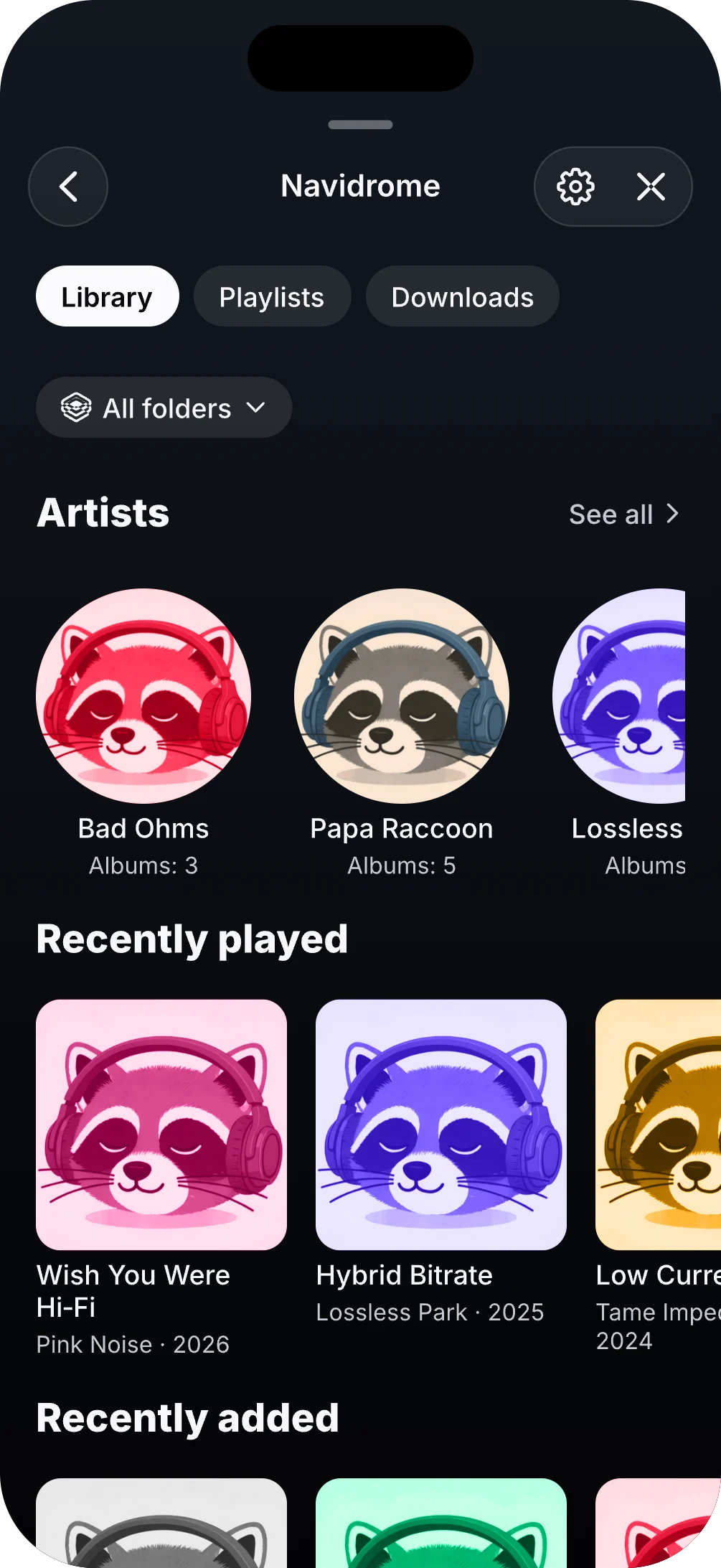
your library, kept yours

Files, playlists and queue stay on iPhone. Nothing sits between you and the music.

Live

radio with context

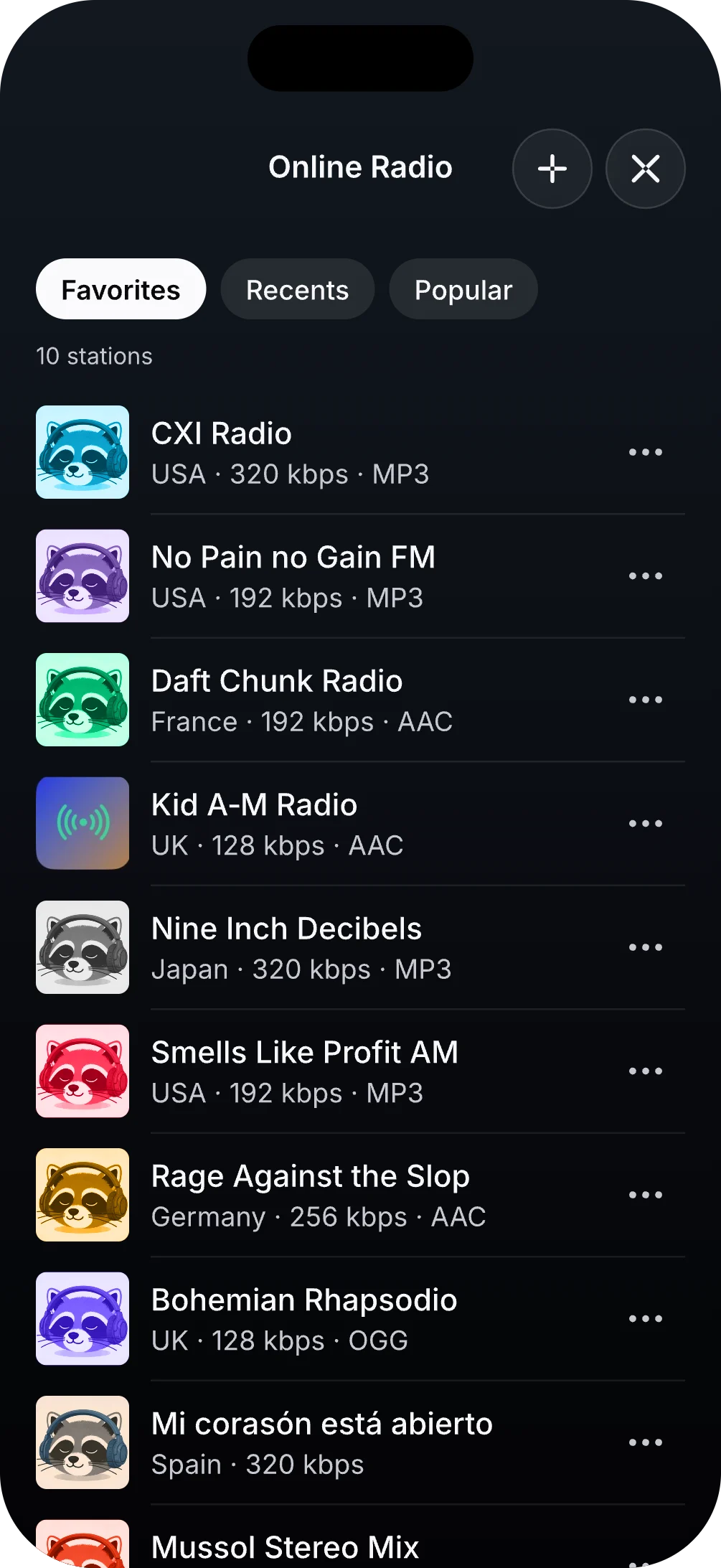
Find public stations, keep favorites and see what the stream is actually sending.

Shows

podcasts without the noise

Follow, download and pick up exactly where you left off.

25

formats kept intact

FLAC, DSD, WavPack, APE, TTA, Opus and VGM/VGZ without flattening your collection.

Clear

the signal stays legible

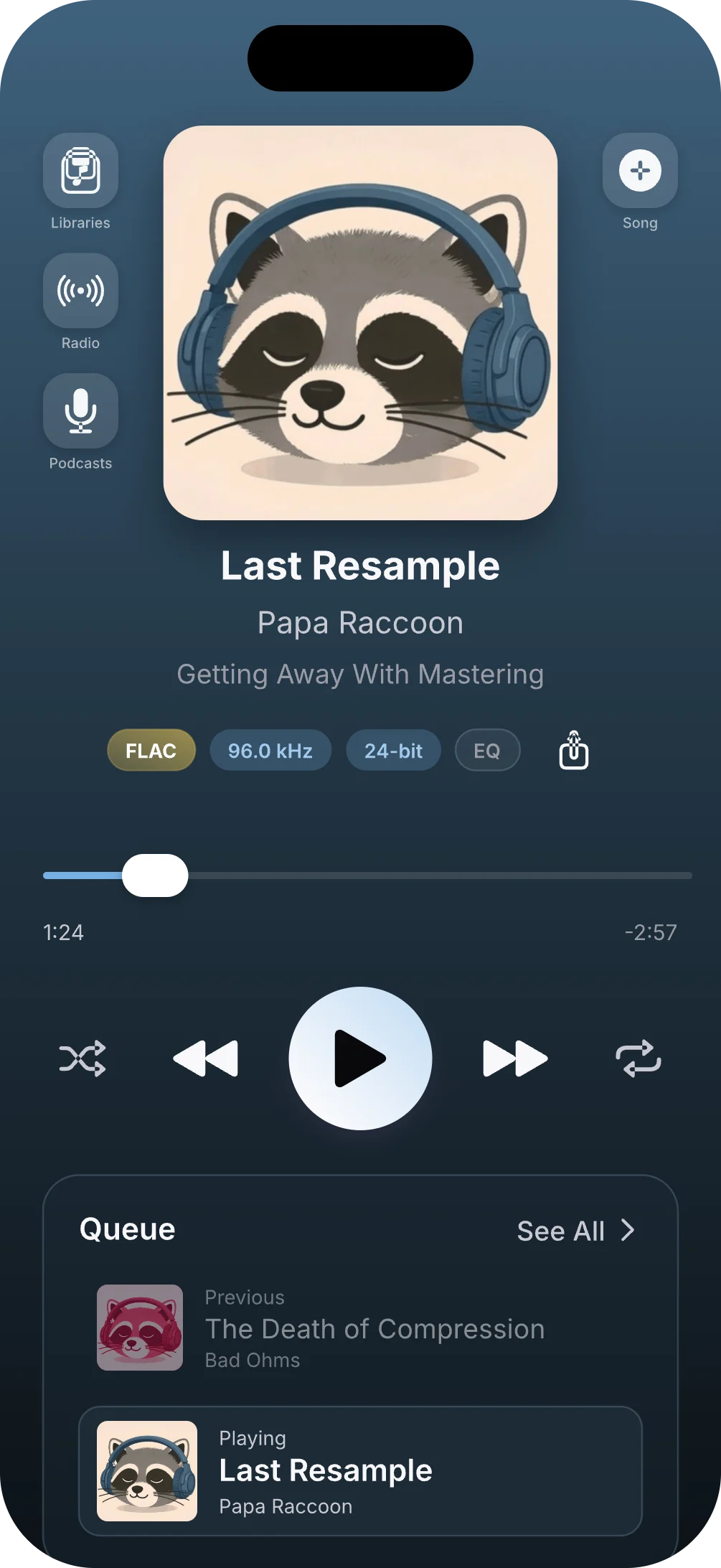
Codec, sample rate, bit depth, output route and quality verdict stay visible.

Zero

accounts needed

Your local library stays on iPhone, with no BitaBit account backend collecting your listening history.

The BitaBit experience

Your music. Shaped your way.

BitaBit brings together graphic and parametric EQ, output correction, immersive artwork, internet radio and a clear view of the audio path. Everything is designed to help you enjoy your music more and understand the sound without getting lost in the technical detail.

For the library you actually own

Keep the collection you built.

From familiar FLAC to DSD, VGM/VGZ and the files other players leave behind, BitaBit plays the collection you already care about. The route stays visible.

25

covered extensions

8

live visuals

40+

retro chips synthesized

0

accounts required

Lossless and PCM
FLACALAC / M4AWAV / WAVEAIFF / AIF / AIFC
Everyday file
MP3
Direct Stream Digital
DSFDFFDSD
Specialist codecs
OpusOgg Vorbis / OGASpeex / SPXWavPack / WV / WVCAPEMusepack / MPC / MP+Shorten / SHNTTA
Chiptune
VGMVGZ
Sound-shaping spectrum
Graphic + Parametric
Low frequenciesHigh frequencies

Advanced equalizer

Shape every detail.

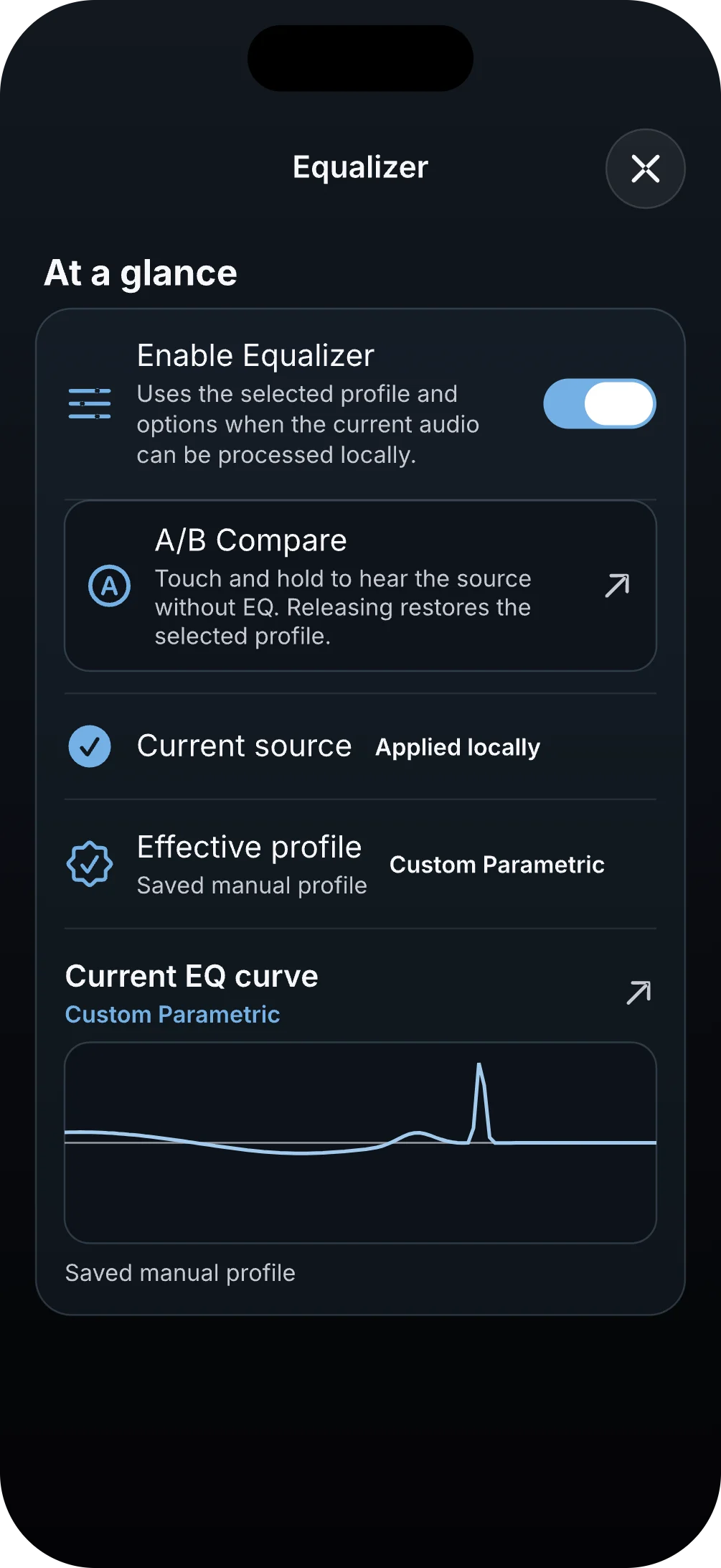
Switch between graphic and parametric editing, start with carefully designed factory profiles, build your own profiles, or let BitaBit choose a curve automatically from the track’s genre. The live response view shows how your choices shape the sound and how much headroom remains.

Graphic editing

Shape familiar frequency bands with direct, accessible controls.

Parametric editing

Set filter type, frequency, gain, and Q when you want finer control.

Open the equalizer directly from the Music Player.

Profiles

Start with one of 17 localized factory profiles, create and edit your own, or map profiles automatically by genre.

Live response

See the effective curve and estimated headroom, with manual or automatic safe input trim, before you listen.

A/B comparison

Hold to compare your current processing with the neutral signal without losing your settings.

Output Correction

Tailored where it matters. Neutral where it doesn’t.

Optional output correction can apply bundled profiles to supported AirPods, known headphones, iPhone speaker categories, and recognized car outputs. Go beyond tone shaping with channel controls, headphone crossfeed, short FIR convolution, and true-peak output protection.

Local signal pathProcessing active
Input
BitaBit DSP
Output

Supported-output correction

Headphone crossfeed

Channel controls

Short FIR convolution

True-peak protection

No guesses. Unknown devices remain neutral instead of receiving a guessed correction.

Explore the advanced signal controls

Supported output profiles

Optional profiles cover supported AirPods, known headphones, iPhone speaker categories, and recognized car outputs only.

Channel tools

Choose mono playback, swap left and right, or control polarity per channel.

Headphone crossfeed

Blend a controlled amount between channels for a more speaker-like headphone presentation.

Short FIR convolution

Import a short FIR impulse response and apply real-time convolution to locally processed audio.

Gain and protection

Input trim, output protection, and clear gain-reduction or clipping diagnostics keep level changes visible.

True-peak diagnostics

A linked 4× true-peak limiter reports pre/post true-peak information and limiter activity.

Immersive Artwork

Get closer to the cover.

Tap the current cover to expand it from the Music Player into a full-screen artwork experience. Pinch to zoom, drag to explore within its bounds, and tap again to return to the exact player position.

Colorful Buena Onda cover artwork used to illustrate the immersive artwork experienceArtwork-driven lightDrag to rotate
Cover color, given room to breathe.
One list. Direct navigation.
Live

Now playing

Nightwave FM

Ambient electronic

AAC · 256 kbps

Station 1 of 3

Navigation stays inside Favorites

Radio Controls

Move through stations without leaving the player.

Previous and Next now move between stations in the stable list you were browsing, so favorites, recent stations, and search results can be explored directly from the player.

Stay in the list you chose

Choose a station from Favorites, Recents, or Search, then continue through that same list.

Previous and Next

Move to the neighboring station without returning to the radio browser.

Controls beyond the screen

The same navigation works with compatible system and vehicle media controls when those controls are available.

Technical Details

Understand the active signal path.

BitaBit explains the source, decoder output, active processing, and the output information iOS can report. When the equalizer is active, it can show the selected mode and profile, applied filters, gain stages, response headroom, limiter activity, and filters bypassed near the source’s Nyquist limit.

Source

Start with the file or stream

See source format, sample rate, and bit depth when that information is available.

Decoder

Know what enters processing

Decoded signal information is kept distinct from the original source details.

Processing

See what BitaBit is doing

Graphic or parametric mode, active profile, genre selection, filters, correction, and gain stages appear as BitaBit processing state.

Response

Read the estimate honestly

Effective response and headroom are clearly identified as estimates, alongside applied filters and limiter diagnostics.

Output

Use what iOS can report

Available output information is labeled as reported by iOS, and unavailable values stay unavailable.

Playback path

Local and remote stay distinct

The screen separates locally processed audio from remote playback paths so one is never mistaken for the other.

Measured, reported, estimated, and unavailable values are labeled separately—so the screen explains what is known without turning an estimate into a promise.

BitaBit at a glance

Six ways the listening experience goes deeper.

Graphic and Parametric EQ

Edit the sound with accessible graphic controls or precise parametric filters.

Profiles and Genre Automation

Use factory profiles, create your own, or resolve a profile automatically from the track’s genre.

Output Correction and DSP

Add supported-device correction, crossfeed, channel tools, convolution, and true-peak protection.

Immersive Artwork

Open the current cover full screen, zoom, pan, and explore its depth.

Radio Station Navigation

Move through the current station list with Previous and Next.

Technical Details

See the source, processing state, effective response, gain stages, and available output information.

Made for listening, not scrolling

Everything careful listening needs.
Nothing that gets in the way.

A deliberately short audio path for the music you own, the stations you find and the shows you follow. No noise, tracking or pressure from another platform.

A clear path to the music

BitaBit keeps its own route deliberately short, avoids hidden app-side re-encoding and lets you see what the source and output are doing.

Radio worth wandering through

Find a new station, return to an old favorite and see live titles, artwork and stream detail whenever the broadcast shares them.

Keep the shows. Lose the feed.

Follow, download and resume with intent. Bring subscriptions with OPML and set the pace that works for you.

Real-time synthesis

VGM/VGZ files are synthesized live with libvgm and more than 40 retro chips. They are generated as you listen, not pre-rendered audio.

Details when you want them

Read the route in sample rate, bit depth and output data. Or get the same answer in plain language.

Pick up where you left off

Your selected files, playlists and queue are ready when you come back, not rebuilt from scratch.

25 real extensions

FLAC, ALAC/M4A, MP3, WAV/AIFF, DSD, Opus, Ogg Vorbis, APE, TTA, WavPack and VGM/VGZ. Every one uses an explicitly registered decoder.

Private by default

No account or analytics SDK. Your local library stays on iPhone; online sources connect directly to their providers.

Thoughtful extras

Sleep TimerShare what is playingSiri & SpotlightOpt-in episode alertsOffline podcast episodesLive radio metadata
One player. Three ways to listen.

Your sound. Your terms.

Files, radio and podcasts belong in one considered player. Each gets the right controls. Nothing competes for your attention.

Local hi-fi

Your collection stays yours.

Bring music in from Files, AirDrop or iTunes File Sharing. It stays on your iPhone. Your queue is ready when you are. The route to your ears stays clear.

  • From FLAC to DSD and VGM/VGZ, including formats most players leave behind.
  • Local playlists and a reorderable queue that are ready when you return.
  • Codec, sample rate, bit depth and output route, in view when it matters.
  • Eight live visualizers and a waveform scrubber that make seeking precise.
Internet radio

The world is already broadcasting.

Search public stations, save the ones that stay with you and pick up where you left off. When a stream sends data, BitaBit makes it useful.

  • Browse by popularity, genre or a name you already know.
  • Keep favorites and recents close, without building another account.
  • Live titles are read from Shoutcast and Icecast when streams provide them.
  • See codec, bitrate and sample rate; copy the technical URL when you need it.
Podcasts

Your podcasts, on your terms.

Keep the podcasts you care about in one focused place. Follow shows, pick up an episode where you left it and take downloads with you when you are offline.

  • Find podcasts, follow shows and keep favorite episodes close.
  • Download episodes and manage the cache for flights, commutes and bad signal.
  • Import or export podcast subscriptions with OPML.
  • Choose playback speed, background refresh and optional new-episode alerts.
Music has a shape

Eight ways to see what you hear.

Real-time FFT analysis gives every track a living visual language: 64 logarithmic bands, waveform feedback and motion that stays out of the music’s way.

Bars

Classic equalizer columns

Waveform

Smooth scrolling oscilloscope

Spectrum

Logarithmic frequency bands

Circular

Radial frequency sweep

Particles

Reactive point cloud

Layered

Depth-stacked bars

Dots

Point-grid intensity

Mirror

Symmetric reflection

The waveform is there to help: read a track’s dynamics, find a section and land exactly where you meant to.

The proof is in the route

One signal. Two useful ways to read it.

Go as deep as you want. BitaBit can show the numbers behind the route, then say plainly whether your music is arriving as it should.

What the signal is doing

Source, route and output. Side by side.

SourceFLAC · 96 kHz · 24-bit · ~4608 kbps
Output routeUSB Audio · 96 kHz reported by iOS · bit depth when available
VerdictBitaBit processing state: no app-side sample-rate reduction, dithering or codec conversion reported in this route.
For people who like to know

No mystery between file and headphones.

Codec, sample rate, bit depth, output route and a quality verdict are all there when you want them. If the signal changes, you can see where and why.

DSD → PCM

DSF and DFF are prepared for playback, with a clear readout when they meet a PCM path or a compatible USB DAC.

VGM · AVAudioSourceNode

VGM/VGZ is synthesized live through libvgm and AVAudioSourceNode: 40+ retro chips, without flattening the track first.

FFT · Accelerate

vDSP groups the signal into logarithmic bands so visualizers can respond without getting in playback’s way.

Controlled AVAudioEngine

Files and live synthesis take a short route to output, while your queue and secure file access are ready when you return.

Signal path

AVAudioFilePlayerNode / SourceNodeMainMixerNodeOutputNodeHardware

Local files travel from decoder to AVAudioPlayerNode. VGM/VGZ uses AVAudioSourceNode with buffers prepared before render, keeping the real-time audio thread focused on playback.

Questions

The details, plainly.

Your own audio files, public internet radio and podcasts. They live in one focused player, but each gets controls and information that make sense for the way you listen.

Your music, in every detail. Always yours.

Files, stations and shows in one player that cares for the sound, reveals the signal and keeps you in control.

iOS 17+ · com.overpal.bitabit